Invoice Season: The Social Engineering Special
SOC déjà vu:
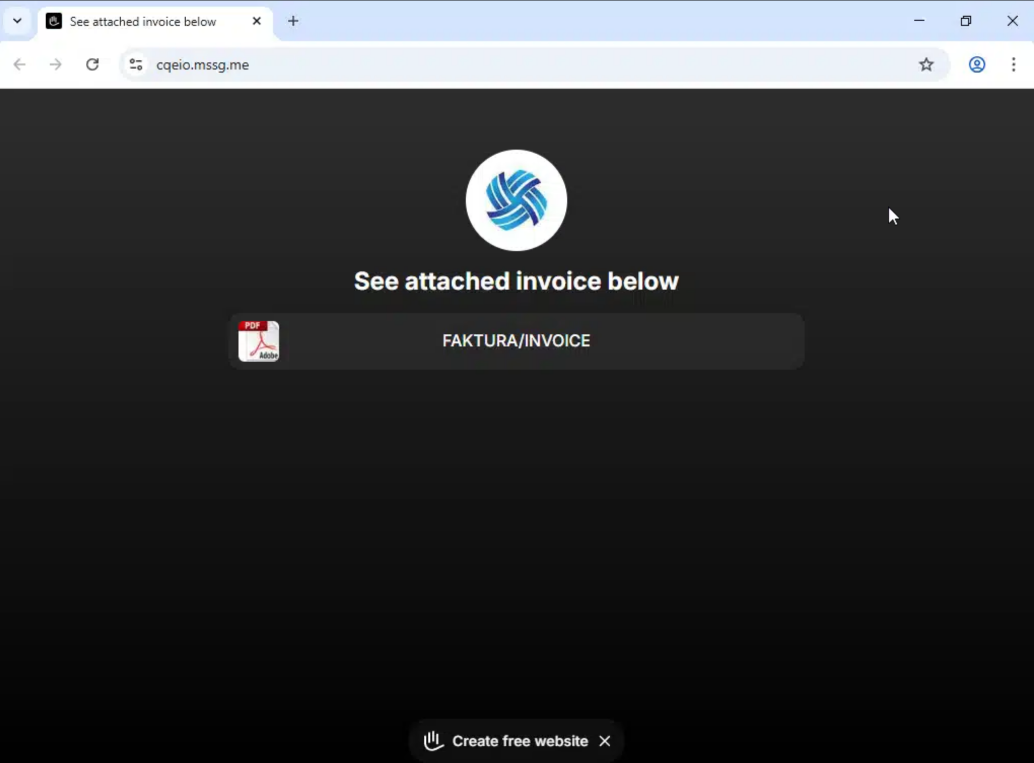
“Invoice attached” (it isn’t) → button → polite-looking landing page → surprise mechanics one click later.
Lately I’ve seen this show up as *.mssg.me links sent from legit-but-compromised mailboxes. That’s why it slips through: the sender reputation is “fine”, the first hop looks boring, and defenders end up stuck in the least useful discussion in security:
“Is this URL malicious?”
Wrong question.
The question that matters is:
“Where does it show up in my tenant, and who interacted with it?”
That’s Failure Management in a nutshell: don’t argue about intent - measure impact.
Why this lure works (and why it’s annoying)
These campaigns win by stacking small truths:
- The email often comes from a real account (compromised mailbox, supplier chain, reused creds, token theft, take your pick)
- The first hop looks harmless-ish (a generic page with a button and a PDF icon)
- The real action is step 2 (redirect chain to credential capture, fake M365 page, malware drop, etc.)
So your detection shouldn’t rely on the page “looking bad”.
It should rely on your environment showing you the pattern
The subject line is doing half the social engineering
With these mssg.me-style invoice lures, the URL is rarely the clever part.
The subject line is.
In the cases I keep seeing, it’s almost always one of these themes:
- Invoice / faktura
- Order / purchase / PO
- Payment / overdue / reminder
- Shipping / delivery notice
- Quote / offer / confirmation
The attacker doesn’t need to be creative - they just need to land in the part of your brain that goes:
“I should probably deal with that.”
Hunt it in Microsoft Defender XDR (Advanced Hunting)
This query finds:
- Emails where Defender actually pulled out a
mssg.meURL (add more domains toSuspiciousDomainsif you want to widen the net). - joins to delivery details,
- and (if available) joins to click telemetry.
Hunting query
// Hunt: mssg.me invoice-lure style phish (email delivery + clicks)
// Microsoft Defender XDR Advanced Hunting
let lookback = 14d;
let suspiciousDomains = dynamic(["mssg.me"]);
let urlMatches =
EmailUrlInfo
| where Timestamp > ago(lookback)
| extend Domain = tostring(parse_url(Url).Host)
| where Domain has_any (suspiciousDomains)
| project NetworkMessageId, Url, Domain;
let delivered =
EmailEvents
| where Timestamp > ago(lookback)
| where DeliveryAction in ("Delivered", "DeliveredAsSpam", "Junked")
| project Timestamp, NetworkMessageId, SenderFromAddress, SenderDisplayName,
RecipientEmailAddress, Subject, InternetMessageId, ThreatTypes, DeliveryAction;
let clicks =
UrlClickEvents
| where Timestamp > ago(lookback)
| extend ClickedDomain = tostring(parse_url(Url).Host)
| where ClickedDomain has_any (suspiciousDomains)
| project ClickTimestamp=Timestamp, NetworkMessageId, AccountUpn, Url, ClickedDomain,
ActionType, Workload;
urlMatches
| join kind=inner delivered on NetworkMessageId
| join kind=leftouter clicks on NetworkMessageId
| project Timestamp, SenderFromAddress, SenderDisplayName, RecipientEmailAddress, Subject,
Url, Domain, ClickTimestamp, AccountUpn, ActionType, DeliveryAction, ThreatTypes, InternetMessageId
| order by Timestamp desc
What to look for in the output
- Same sender to many recipients (blast pattern)
- Same URL reused across subjects
- Clicks from “not usually risky” users (finance/admin/exec assistants = classic)
- Clicks close to delivery time (automation + curiosity)

What I do next (the part people skip)
Once you’ve found the messages and clicks, don’t stop at the first hop.
- Pull the second-hop URL
- If you have click events: follow the
Urlfield and look for additional redirects in the chain. - If you don’t: isolate one sample safely (detonation or controlled browsing) and capture the redirect destination.
- If you have click events: follow the
- Scope the sender account (because this is often the real breach)
- sign-in anomalies, inbox rules, OAuth consent, mailbox forwarding, unusual token activity.
- if it’s a supplier/partner: you may not see all that - but you can still block/contain.
- Block smart, not loud
- Domain-wide blocks can be messy if the service is abused broadly.
- Consider: URL patterns, known landing paths, and IOC from the second hop.
- Communicate like an adult
- “You received an email that looked legitimate, it wasn’t your fault, here’s what we did, here’s what to do if you clicked.”
FailureManagement takeaway
If a “PDF invoice” lives behind a generic landing page, it’s not an attachment - it’s a funnel.
Don’t debate the funnel.
Measure who entered it.
Then go one click deeper.