A Purview Label Baseline Built From Doing This the Hard Way (Repeatedly)
Most Purview label strategies don’t fail because of technology.
They fail because humans do what humans do:
- we overthink
- we argue about naming
- we chase edge cases
- we try to design the “perfect” taxonomy before we even know what people actually create and share
And then we end up in what I call workshop limbo: a long series of meetings where everyone agrees labels matter, but nobody wants to be the one who decides what “Confidential” means.
So I started doing something else.
I built a baseline sheet - an Excel workbook - that I bring to almost every engagement now. Not because it’s magical. Not because it’s “the one true model.”
But because it solves the real problem:
It gets us from “we should do labels” to “we have a baseline we can approve, deploy, and improve.”
That’s the whole point.
Who this is for
This is useful if you’re:
- starting a Purview labeling journey and want a practical baseline
- trying to rescue a labeling project stuck in workshop limbo
- looking for a way to align Security, IT, Compliance, and the business without reinventing everything
Why I’m sharing this
Because I’m tired of watching good initiatives die in workshop limbo.
A baseline doesn’t replace governance - it enables it.
A baseline doesn’t guarantee adoption - it makes adoption possible.
If you’re starting a Purview labeling journey (or trying to rescue one), use this as a starting point, adapt it to your world, and iterate from real usage.¢
What it is (and what it isn’t)
This workbook is a starting point - a way to accelerate decisions without dragging the organization through another “let’s invent classification from scratch” exercise.
It helps you answer three questions fast:
- What labels do we start with?
- What does each label actually do?
- How do we scale without creating label chaos?
The goal is not perfection. The goal is momentum.
It is:
- a baseline label taxonomy (simple, understandable, defensible)
- a high-level view of recommended protection behavior per label
- a way to align Security, IT, Compliance, and the business
- a stepping stone into retention labels (without making it a legal nightmare)
It is not:
- “compliance” just because you bought Purview
- a one-click implementation guide
- a legal retention schedule (you still need Legal/DPO)
Owning the tool is not the same as operating the control. That’s where most programs quietly fail.
The Workbook
The workbook consists of three sheets:
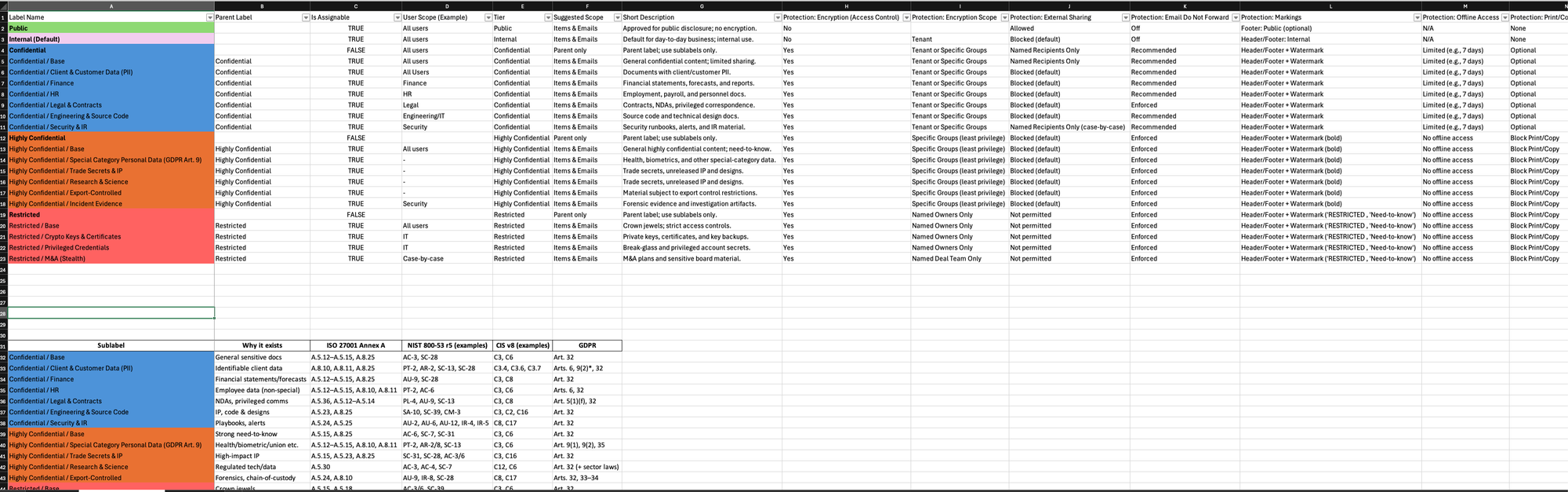
- Label baseline (the backbone)
- Labels & sublabels (how you avoid sprawl)
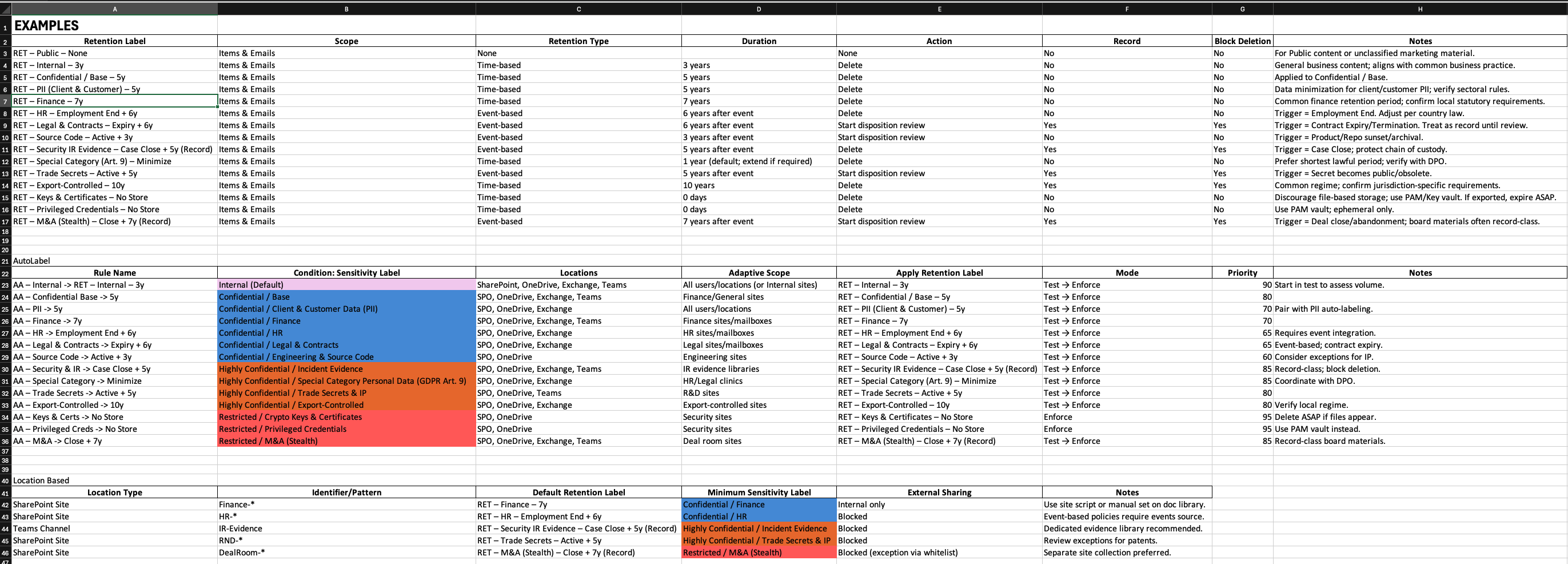
- Retention labels (the part everyone avoids)
Each sheet is a template you can build from. It’s not set in stone - and you can extend it with your own requirements.
Framework mapping (to help approval)
Because “trust me bro” doesn’t get budgets approved: the baseline sheets include ISO/NIST/CIS examples and a GDPR hook to support governance conversations and make internal sign-off easier. It’s not a full compliance crosswalk - just enough to help the model get approved.
Label Baseline (The backbone)
This is the “don’t overcomplicate it” model. Five tiers most organizations can agree on:
- Public
- Internal
- Confidential
- Highly Confidential
- Restricted
Each tier includes the high-level “shape” of protections you’d typically apply:
- encryption / access control
- external sharing guidance
- markings (header/footer/watermark)
- offline access time limits (where relevant)
- Copilot & AI restrictions (where relevant)
- device requirements / session controls (where relevant)
The point is consistency. People can disagree about details later - but they can’t move without a baseline.

Label & Sublabel Baseline (How you avoid label sprawl)
This is where projects either get smart… or die.
A common mistake is:
- too few labels (everything becomes “Confidential”)
or - too many labels (users stop selecting correctly)
Sublabels are the middle path: keep the core model simple, add precision only where it matters.
Examples of sublabels in the baseline:
- Confidential / Client & Customer Data (PII)
- Confidential / Finance
- Confidential / HR
- Confidential / Legal & Contracts
- Confidential / Engineering & Source Code
- Confidential / Security & IR
And then the heavier stuff:
- Highly Confidential / Special Category Personal Data (GDPR Art. 9)
- Highly Confidential / Incident Evidence
- Highly Confidential / Trade Secrets & IP
- Restricted / Privileged Credentials
- Restricted / M&A (Stealth)
Not because you need all of them on day one - but because these are the ones that keep coming up in real life.
Retention labels (The part everyone avoids)
Sensitivity labels answer: “how should this be protected?”
Retention labels answer: “how long do we keep it, and what happens after?”
Many organizations either:
- avoid retention entirely, or
- move too fast and create operational pain
The workbook includes a set of example retention labels and common patterns:
- Internal for X years
- Finance for Y years
- HR based on employment end + X
- Contracts based on expiry/termination + X
- Incident evidence based on case close + X
- “No store here” guidance for things like privileged credentials
It’s not law. It’s structure - a way to run the conversation properly with Legal/DPO and IT.
Compliance model before labels (this is what gives the tiers meaning)
Before you argue about label names or sublabels, you need a simple compliance model.
Because the “tiers” aren’t a Microsoft setting - they’re a business decision:
- What does Internal actually mean in your company?
- What belongs in Confidential vs Highly Confidential?
- What restrictions does that impose (sharing, storage, device requirements)?
- What compliance requirements apply (GDPR, contracts, industry rules)?
- And what are the implications if it’s involved in a security incident (unauthorized access, exposure, loss) - impact, reporting obligations, reputation, cost?
Once you’ve defined that, the tier backbone becomes easy - and the technical settings become implementation, not debate.
How to use it without overthinking it
This is the approach I recommend (and it’s simple on purpose):
- Define what each tier means (restrictions + obligations + incident impact)
- Agree on a tier backbone (keep it simple: 5 label tiers - start with tiers, not sublabels)
- Decide the default label (Maintain focus on work flow and collaboration ability)
- Pick 6–10 sublabels that match reality (if you pick 25, you’re building an adoption problem)
- Pilot before enforcement - include different parts of the org (learn safely)
- Add retention when the model is stable (powerful, easy to mess up)
Get the workbook
Download: